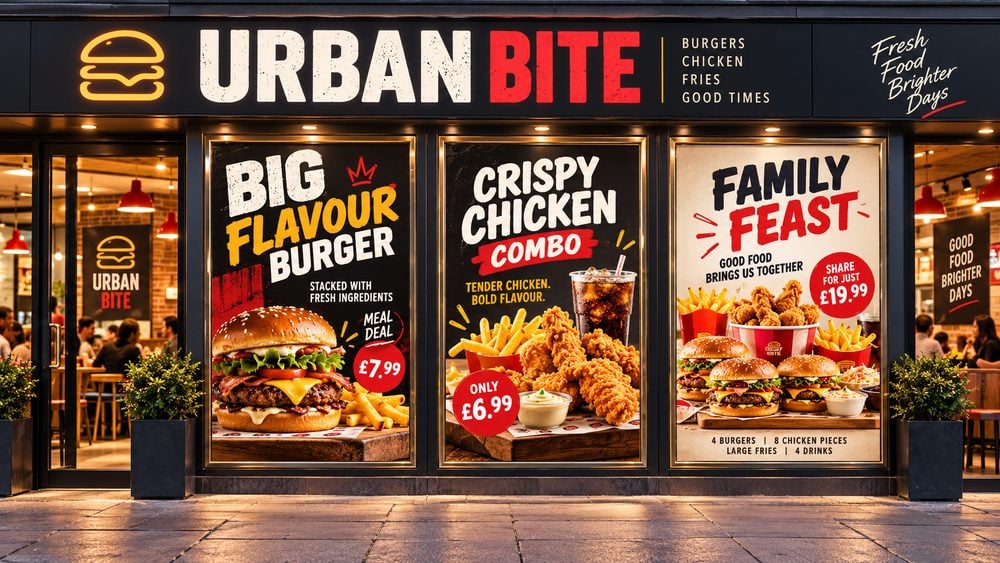
Posters enjoy a clear advantage when it comes to capturing the attention of viewers, thanks to their imposing size. Traditionally composed of a blend of graphic images, text, and vibrant, contrasting colours, posters have served as a promotional medium for centuries. They’ve been utilised to disseminate propaganda, organize demonstrations, and, more recently to advertise films, concerts, and large public gatherings.
In contrast to other forms of printed promotional advertising, such as leaflets or booklets, posters aim to make a bold statement to their audience from a distance. However, in settings like doctor’s offices, waiting rooms, and hotels, a more informative approach can be adopted. This allows for the conveyance of detailed information in an educational manner rather than relying on shock tactics.
Outlined below are some key elements to consider when designing your poster:
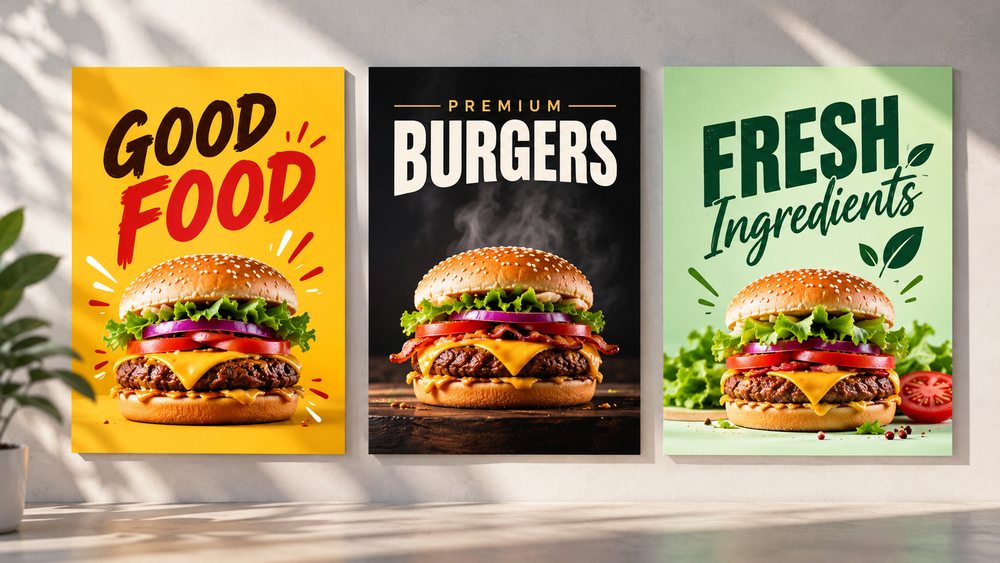
Choosing the right background colour is essential for creating an effective poster design. Your background should complement the text and images without overpowering your main message. A simple, well-chosen colour helps important information stand out and makes your poster easier to read.
Consider colour contrast and the message you want to convey. For example, yellow can create excitement and attract attention, black can give your poster a premium feel, while green often suggests freshness and nature.
Avoid overly busy backgrounds, particularly when your poster contains detailed information. Make sure there is enough contrast between your text and background so your message remains clear, even when viewed from a distance.
Top tip: Test different background colours before finalising your design. Sometimes, a simple colour change can make your commercial poster significantly more eye-catching and effective.
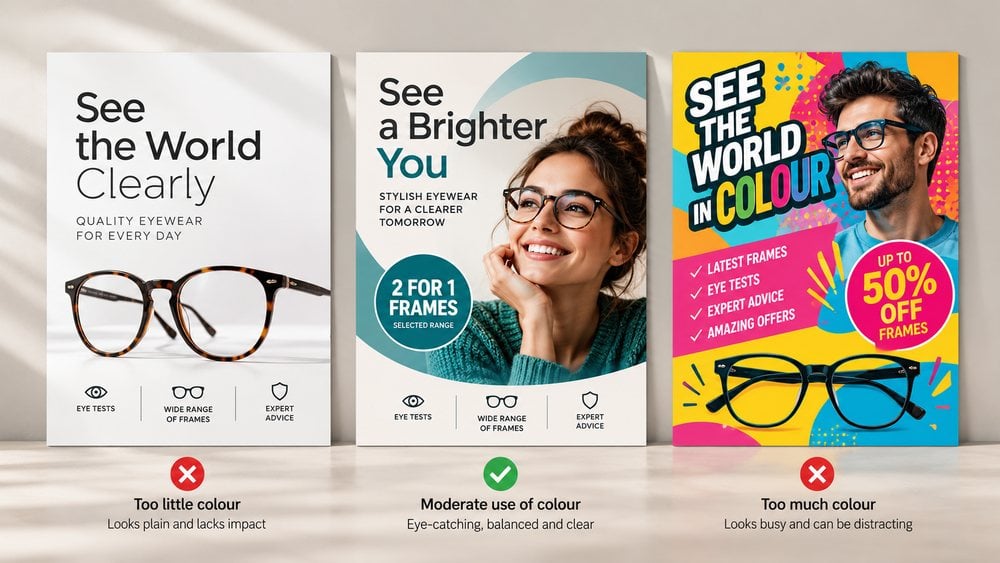
Colour plays an important role in creating an eye-catching poster, but using too many colours can make your design look cluttered and distract from your message. The key is to find the right balance between visual appeal and readability.
Limit your colour palette to two or three complementary colours that work well together and reflect your brand. For example, a classic black-and-white combination can create a clean, professional appearance, while introducing a single accent colour can help highlight important information, such as a special offer or call to action.
As illustrated in the optician poster examples above, too little colour can make an advertisement appear plain, while excessive colour can overwhelm the viewer. A balanced approach draws attention to the key message without unnecessary distractions.
Top tip: Follow the 60-30-10 colour rule as a starting point: use 60% for your dominant colour, 30% for a secondary colour and 10% for an accent colour. This helps create a visually balanced poster that looks professional and communicates your message clearly.
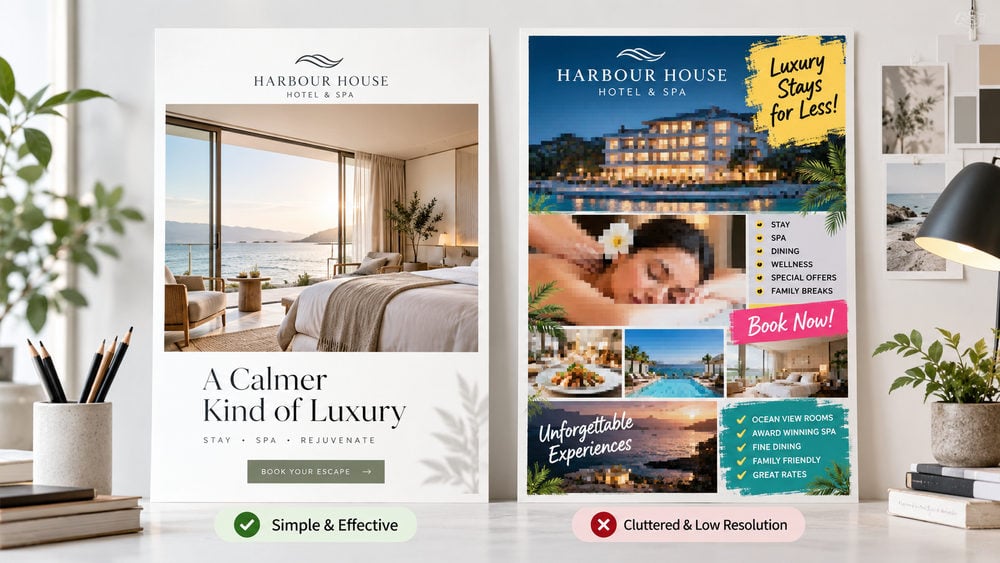
A simple, well-organised poster is often more effective than one overloaded with text, images and unnecessary details. Your main goal should be to capture attention and communicate your message quickly and clearly.
Focus on one strong headline, a high-quality image and the most important information, such as your offer, contact details or call to action. Avoid lengthy paragraphs and leave enough white space between elements to make your poster easy to read.
Image quality is equally important, particularly when designing posters for print. Low-resolution images can appear blurry or pixelated when enlarged, making your advertisement look unprofessional. Aim for images with an effective resolution of 300 DPI at their final printed size to achieve sharp, high-quality results.
As illustrated in the hotel poster examples above, a clean layout with a clear message and sharp imagery creates a more professional impression than a cluttered design filled with competing elements.
Top tip: Before sending your poster to print, view it at its intended size and check that the text is readable, the images are sharp and your main message stands out. Remember, less is often more when it comes to effective poster design.
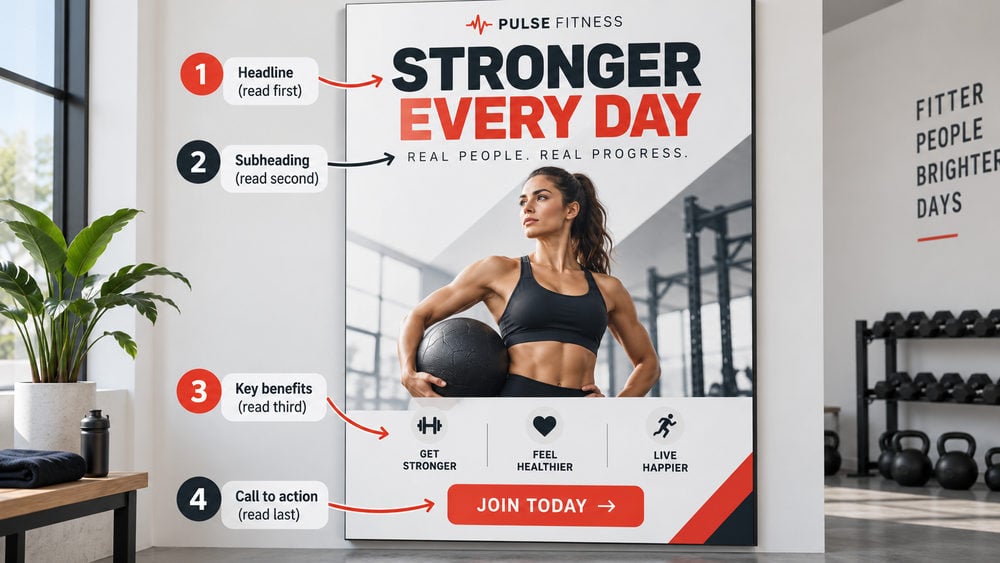
An effective poster should guide the viewer naturally through the information, starting with the main headline, followed by supporting details and finishing with a clear call to action. This is known as visual hierarchy, and it helps people understand your message quickly without searching for important information.
Use larger, bolder fonts for headlines, smaller text for supporting information and contrasting colours to highlight key messages. As illustrated in the fitness poster example above, the design guides the reader from the main headline through the benefits before directing attention to the “Join Today” call to action.
Consider where your poster will be displayed and how much time people have to read it. Posters positioned along busy roads or in shop windows should communicate their main message almost instantly. However, posters displayed at bus stops, reception areas or waiting rooms can include slightly more information because viewers have longer to engage with them.
Top tip: Test your poster using the 3-second rule. Show it to someone briefly and ask what they remember. If they cannot identify the main message within three seconds, consider simplifying the layout, increasing the headline size or improving the contrast between important elements.
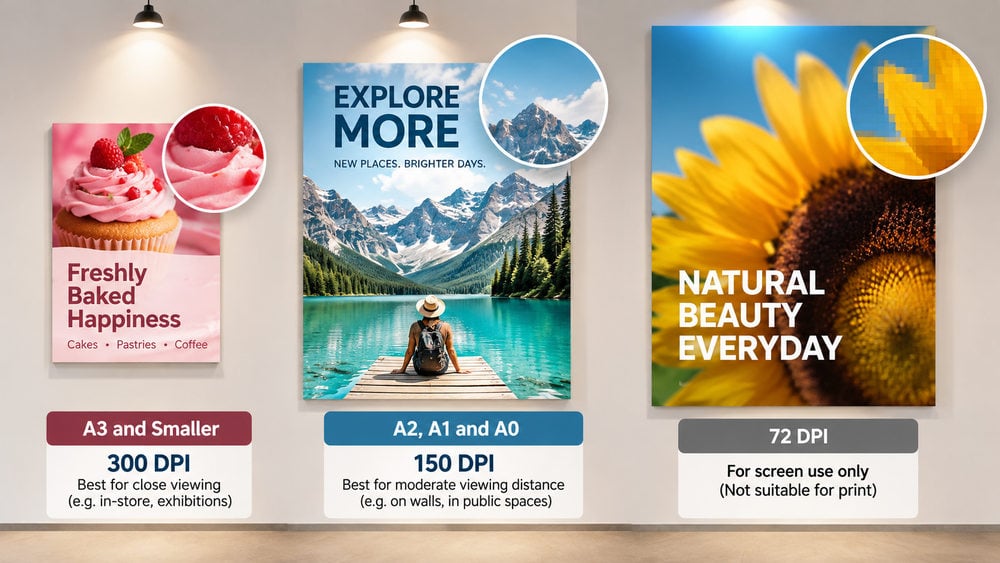
Choosing the correct image resolution is essential for producing sharp, professional-looking posters. Using a small, low-resolution image and enlarging it to A0 size can result in blurry or pixelated prints, potentially damaging your brand’s professional appearance.
However, larger posters don’t always require the same resolution as smaller printed materials. This is because posters are typically viewed from a greater distance, making slight reductions in image detail less noticeable.
The ideal resolution depends on your poster size and how far away your audience will be when viewing it.
300 DPI – Small Posters (A3 and Smaller): Recommended for posters, flyers and brochures viewed up close. This resolution provides sharp images, clear text and excellent print quality.
150 DPI – Large Posters (A2, A1 and A0): Often suitable for larger posters viewed from a few feet away. It provides a good balance between image quality and manageable file sizes.
72 DPI – Digital Screens: Commonly associated with screen graphics, but generally insufficient for printing posters at full size when the image has too few pixels. Enlarging these images can produce blurry, pixelated results.
As illustrated in the poster resolution examples above, higher-resolution images maintain sharper details, while low-resolution images can become noticeably pixelated when enlarged.
Always check the effective resolution of your images at their final printed size, rather than relying on the DPI setting alone. A high-quality image can still lose clarity if enlarged beyond its original dimensions.
Top tip: Before submitting your poster for printing, check your images at the intended print size and confirm the recommended resolution with your printing company. This helps avoid disappointing results and ensures your finished poster looks professional.
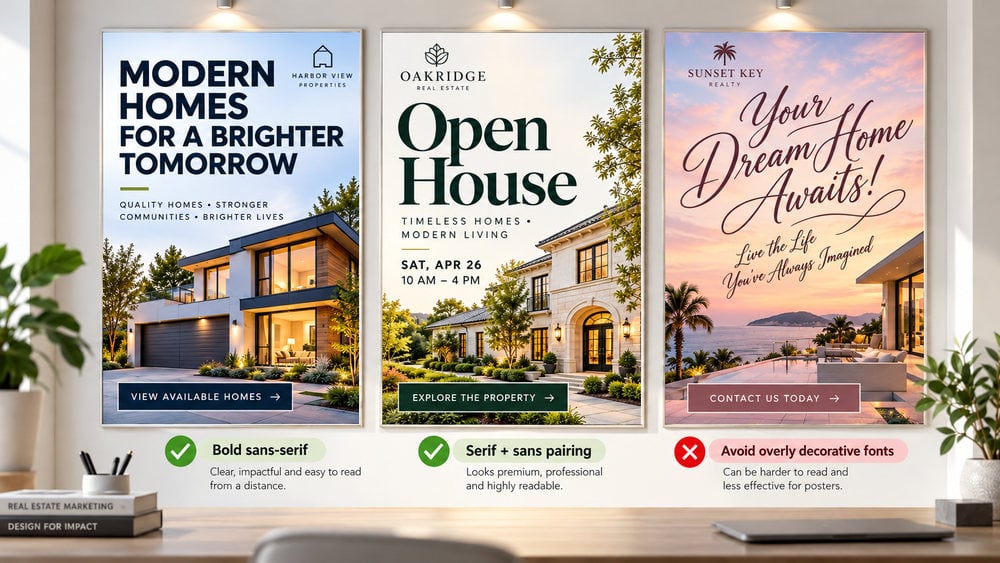
Choosing the right fonts is essential for creating an eye-catching poster that communicates your message clearly. Your typography should be easy to read at a glance, particularly when your poster is displayed in a busy location or viewed from a distance.
Bold, sans-serif fonts such as Arial, Helvetica and Montserrat are excellent choices for poster headlines because they offer clear lettering and strong visual impact. Serif fonts can also work well, particularly for premium brands or elegant designs. However, overly decorative or intricate script fonts should be used sparingly, as they can make important information difficult to read.
Avoid mixing too many different fonts. As a general rule, stick to one or two complimentary typefaces, using different sizes and weights to distinguish headlines from supporting information. This creates a consistent, professional appearance and helps guide the reader through your poster.
As illustrated in the real estate poster examples above, bold sans-serif fonts deliver immediate impact, while carefully paired serif and sans-serif fonts create a sophisticated appearance without compromising readability.
Top tip: Before finalising your poster, print a test copy or view it from the intended reading distance. If your headline isn’t immediately readable, consider increasing the font size, choosing a bolder typeface or improving the contrast between the text and background.
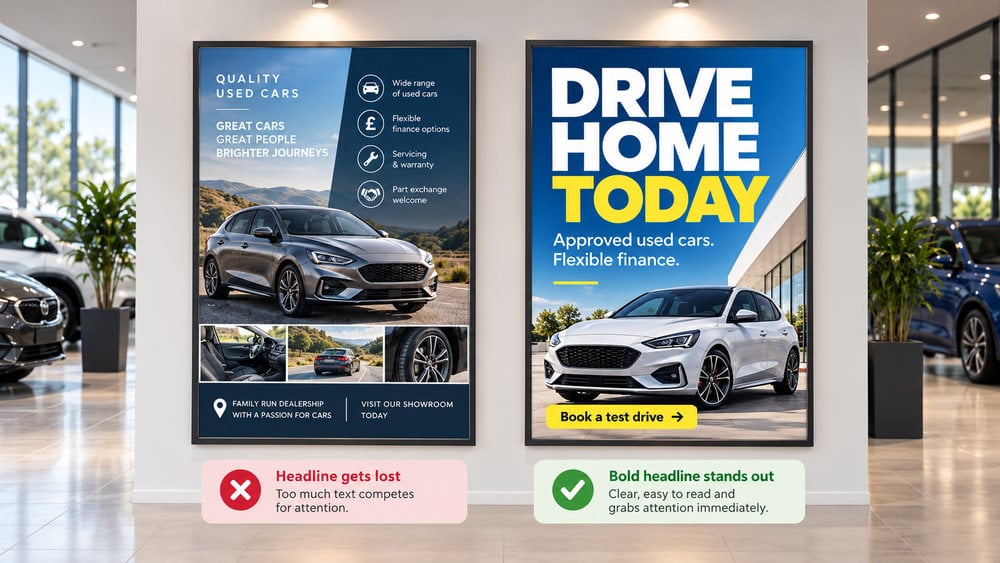
Your poster headline is often the first thing people notice, so it needs to grab attention and communicate your message instantly. Take inspiration from newspaper headlines by using bold, oversized text that stands out from the surrounding design.
Keep your headline short and memorable, ideally six words or fewer. Focus on a clear message that sparks interest, highlights a benefit or encourages action. For example, “Drive Home Today” is more impactful than a lengthy description of a car dealership’s services.
As illustrated in the car dealership poster examples above, a large, bold headline immediately draws attention, while too much competing text can make the main message difficult to identify.
Use a smaller subheading to provide additional information, such as a special offer or key benefit. Make sure there is enough contrast between the headline and background so your message remains readable from a distance.
Top tip: Try the 3-second test. Show your poster to someone for three seconds and ask what they remember. If they cannot recall the headline or main message, consider making it shorter, larger or more prominent.
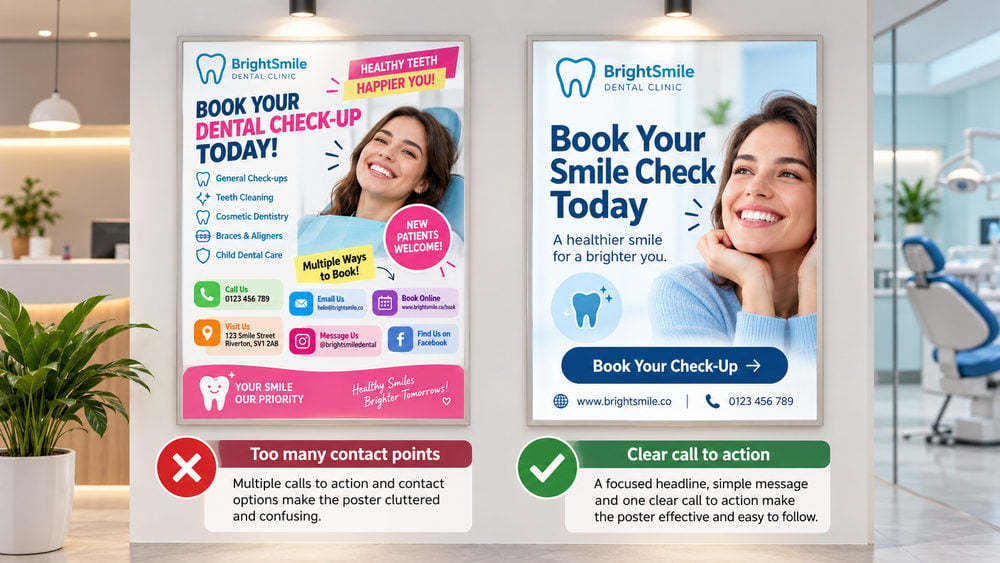
An effective poster should do more than grab attention; it should encourage your audience to take action. Once people understand your message, they need clear instructions on what to do next, whether that’s visiting your website, making a phone call, booking an appointment or purchasing a product.
This is known as a call to action (CTA). Use short, direct phrases such as “Book Now”, “Shop Today”, “Get a Free Quote” or “Visit Our Website”. Make your CTA stand out using bold text, contrasting colours or a clearly defined section of your poster.
Avoid including too many contact options. Multiple phone numbers, website addresses, email addresses and social media accounts can clutter your design and confuse potential customers. Instead, focus on one primary action and include a second contact method only when necessary.
As illustrated in the dental clinic poster examples above, a clear “Book Your Check-Up” message is more effective than overwhelming the viewer with numerous ways to get in touch.
Top tip: Make it as easy as possible for people to respond. Use a short, memorable website address, a clearly displayed phone number or a QR code that links directly to your booking or enquiry page. Always test QR codes before sending your poster to print.
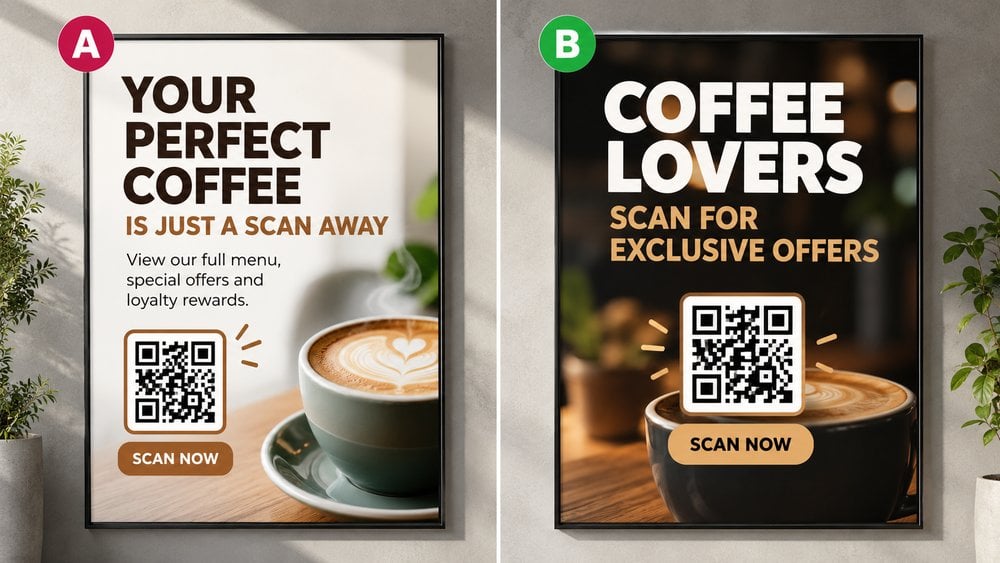
Adding a QR code to your poster design is an effective way to connect printed advertising with your online content. Instead of expecting people to remember a website address or phone number, they can simply scan the code with their smartphone to access your website, view special offers, book appointments or discover more about your services.
Make your QR code easy to spot and scan. Position it in a clear area of your poster, with sufficient space around it. Include a short call to action, such as “Scan for Exclusive Offers” or “Scan to Book Now”, so readers know exactly what to expect.
QR codes also provide an opportunity to measure the effectiveness of your poster advertising through A/B testing. As illustrated in the coffee shop poster examples above, you can create two designs with different headlines or promotional messages, each featuring a unique QR code.
By linking these codes to separately tracked website URLs, you can compare which poster generates more scans, enquiries or conversions. This valuable information helps you refine future designs and improve your marketing results.
Top tip: Always test your QR code on different smartphones before printing. Make sure it scans easily from a realistic viewing distance and links directly to the correct page. Avoid making the code too small or placing it over busy backgrounds.
Creating an effective poster design is about more than simply making something visually appealing. It’s about capturing attention, communicating your message clearly, and encouraging your audience to take action. Whether you’re promoting a business, advertising an event, or sharing important information, a well-designed poster can make a lasting impression.
By choosing the right colours, using bold headlines, keeping your layout simple, and selecting easy-to-read fonts, you can create a poster that stands out without overwhelming your audience. Remember to consider viewing distance, image resolution, and print quality to ensure your design looks just as impressive in print as it does on screen.
Most importantly, keep your message clear and your call to action simple. An effective poster should communicate its purpose within seconds and make it easy for viewers to know what to do next.
Once you’ve perfected your design, bring it to life with professional poster printing from Cheap as Prints. With the right combination of thoughtful design and high-quality printing, your poster can attract attention, engage your audience, and help you achieve your promotional goals.
Remember, a great poster doesn’t just get noticed — it gets your message across.
We use cookies to enhance your experience. By continuing, you agree to our Privacy Policy.
Select which cookies you want to allow:
Save 5% on your order when you subsribe to our newsletter.
